What Is Rate Limiting? A Practical Guide for API Developers

What Is Rate Limiting?
Rate limiting caps how many requests a client can send to a server inside a fixed time window. When the cap is hit, further requests are rejected (usually with an HTTP 429 status) or queued until the window resets. APIs use rate limiting to protect backends from abuse, share capacity fairly, and keep response times predictable under load.
The rest of this guide covers how the cap is counted, how the server tells clients they have been throttled, and how clients should react.

Why Rate Limiting Matters
A public API with no rate limiting is a bug waiting to happen. One misconfigured cron job, runaway script, or leaked credential can saturate your database or run up your cloud bill in an afternoon.
Preventing abuse and DDoS
A botnet pointed at /login will try millions of credential pairs unless something stops it. Per-IP and per-account limits push brute force into the noise; at 10 attempts per minute, it becomes impractical against a decent password policy. OWASP lists this as API4:2023, Unrestricted Resource Consumption.
Rate limiting at the edge does not replace a DDoS scrubbing service, but it is the first layer deciding whether a request reaches your application logic.
Protecting backend stability and cost
Most APIs have one or two expensive endpoints: a fan-out search, an LLM completion, a PDF render. Without per-endpoint limits, a handful of clients can pin your CPU and inflate your bill. A cap of 10 requests per minute on the expensive route keeps the rest of the API responsive when one customer gets aggressive.
Rate limiting connects to broader API governance: limits encode a contract for what the platform promises to serve, and what it will refuse.
Ensuring fair access for legitimate users
When one client floods the API, every other client sees slower responses and more timeouts. Rate limits keep shared capacity from being monopolized by a noisy minority, and matter most on free tiers, where unmetered consumers would otherwise compete with paying customers.
How Rate Limiting Works
Every limiter answers three questions: who is this request from, how many have they made, and what to do when they exceed the cap?
Identifying clients (IP, user ID, API key)
A limiter needs a key. The usual choices, in increasing order of trust:
- IP address, works for unauthenticated traffic but breaks behind NATs and is trivially defeated by a botnet.
- API key, the standard for authenticated APIs. Tie the limit to the key so customers can rotate without losing budget.
- User ID or account ID, useful when one customer has many keys and you want an aggregate limit per organization.
- Combination, production systems usually layer all three: per-IP for abuse, per-user for fairness, per-endpoint for cost control.
Pick the most specific identifier the request carries. For a walkthrough of issuing and rotating keys at the gateway layer, see our guide to API keys in AWS API Gateway.
Counting requests against a quota
Once you have a key, increment a counter on every request. The counter lives in a fast store (Redis is a common choice) because the limiter sits on the hot path and has to answer in single-digit milliseconds. The counter resets according to whichever algorithm you picked.
Returning HTTP 429 responses and Retry-After headers
When the counter exceeds the limit, the server replies with 429 Too Many Requests (RFC 6585) and a Retry-After header so the client knows how long to wait:
HTTP/1.1 429 Too Many Requests
Content-Type: application/json
Retry-After: 30
RateLimit-Limit: 100
RateLimit-Remaining: 0
RateLimit-Reset: 30

{
  "error": "rate_limit_exceeded",
  "message": "You have exceeded the limit of 100 requests per minute.",
  "retry_after_seconds": 30
}
The current IETF draft for RateLimit header fields has evolved from the older RateLimit-Limit, RateLimit-Remaining, and RateLimit-Reset fields toward consolidated RateLimit and RateLimit-Policy fields. The work is still a draft, not a published RFC. Many APIs still expose older X-RateLimit-* headers, and some gateways continue to emit the earlier three-header shape. GitHub, for example, uses lowercase x-ratelimit-limit, x-ratelimit-remaining, x-ratelimit-reset, and x-ratelimit-used and returns either 403 or 429 on excess. If you support more than one format, document exactly which headers your API returns and what each value means.
Common Rate Limiting Algorithms
Four algorithms show up in most production systems. They differ on burst tolerance, accuracy at the window boundary, and memory cost.
Fixed window counter
Bucket every request into a fixed window (say each calendar minute). Increment a counter; reject anything past the limit; reset at the next window.
Fixed window is dead simple and uses one counter per key. The catch is the boundary: a client can send the full quota at 12:00:59 and the full quota again at 12:01:00, doubling the effective rate for two seconds. Acceptable for internal services, problematic for a strict public cap.
Sliding window log and sliding window counter
The sliding window log stores a timestamp for every request and counts how many fall inside the current window on each new request. Exact, but memory grows with request rate.
Sliding window counter is the practical compromise. It keeps two fixed-window counters (current and previous) and computes a weighted average based on where in the window the request lands. The math is approximate but the boundary spike disappears and memory stays small. Many modern API gateways default to sliding window counter for simple cases, though fixed window, token bucket, and leaky bucket remain common depending on the gateway and use case.
Token bucket
A bucket holds N tokens and refills at R tokens per second. Each request consumes one token. Empty bucket means the request is rejected; otherwise it goes through.
Token bucket allows bursts. A client that has been idle can spend the full bucket immediately, then settle into the refill rate. AWS, Stripe, and many other production APIs default to token bucket because real traffic is bursty.
Leaky bucket
Leaky bucket is token bucket’s inverse. Requests join a queue (the bucket), and the server drains the queue at a fixed rate. A full queue drops new requests.
The result is a smooth output stream, useful when the downstream service cannot handle bursts at all. The cost is latency: a queued request waits even when the system has capacity.
Algorithm comparison
| Algorithm | How it works | Burst handling | Memory footprint | Best for |
|---|---|---|---|---|
| Fixed window | Counter resets every N seconds | Allows 2x burst at window boundary | Lowest (one counter per key) | Quick wins, internal APIs, when boundary spikes are acceptable |
| Sliding window | Weighted blend of current and previous window counters | Smooths out boundary spikes | Low (two counters per key) | Public APIs that need an accurate cap without log overhead |
| Token bucket | Bucket of N tokens, refilled at R per second | Allows bursts up to bucket size | Low (token count and last-refill timestamp) | Bursty real-world traffic, most public REST APIs |
| Leaky bucket | Queue drained at fixed rate | Smooths bursts into a steady output | Medium (queue size) | Protecting fragile downstream systems that need a flat rate |
Sliding window counter is the safest default for most public APIs. Switch to token bucket to be generous with idle customers, leaky bucket when downstream cannot absorb bursts.
Rate Limiting vs. API Throttling
The terms get used interchangeably but describe different behaviors.
Rate limiting rejects requests over the cap; the client gets a 429 and has to back off. Throttling slows requests instead, usually by queuing or adding delay. The client still gets a response, just later than it asked for.
Most API gateways offer both. Use rate limiting at the edge to fend off abuse and protect capacity. Use throttling deeper in the stack when refusing a request costs more than making it wait, for example on async batch jobs where a few seconds of queueing is invisible to the user.
Rate Limiting in APIs, Practical Patterns
Per-user vs per-IP vs per-API-key strategies
Layer them. A typical stack:
- Per-IP, low limit on unauthenticated traffic, stops scrapers and credential-stuffing bots before they reach auth.
- Per-API-key, generous limit after authentication, the contract customers see in your docs.
- Per-endpoint, only on expensive routes; search or LLM proxy gets a tighter ceiling than
/health.
Each layer protects something different. Drop one and the others usually surface a problem it would have caught.
Tiered limits for free vs paid customers
Rate limits double as a pricing lever. Free gets 100 requests per hour, Pro gets 10,000, Enterprise is negotiated. Tiered limits are a low-friction way to introduce usage-based pricing. For guidance on setting these ceilings without burning your best accounts, see Best Practices for API Rate Limits and Quotas.
Real-world examples make the trade-offs concrete:
- GitHub REST API: 60 requests per hour unauthenticated, 5,000 per hour for authenticated users with a personal access token, 15,000 per hour for GitHub Apps owned by an Enterprise Cloud org.
- X (formerly Twitter) API v2: publishes endpoint- and tier-specific limits that change frequently, so the official rate-limit table and developer portal are the source of truth.
- Stripe API: documents multiple limits, including account-level, endpoint-specific, concurrency, and read-allocation limits. Because Stripe’s limits vary by endpoint and account activity, link to Stripe’s current rate-limit docs rather than hard-coding a number.
All three publish their limits so customers can plan for them.
Communicating limits via headers
Document the headers you return and keep them stable. The IETF RateLimit header work standardizes three:
RateLimit-Limit, the cap for the current window.RateLimit-Remaining, requests left before the client is throttled.RateLimit-Reset, seconds (delay-in-seconds) until the limit resets. The legacyX-RateLimit-Resetheader uses a Unix timestamp instead.
If you already shipped the older X-RateLimit-* form, return both during a migration. Whatever you choose, document it.
Handling Rate Limit Errors as a Consumer
If you call someone else’s API long enough, you will see 429s. Retrying immediately just piles load onto an overloaded server. Use exponential backoff with jitter: wait, retry, double the wait on the next failure, and add randomness so retries do not hit the server in lockstep.
A minimal Python implementation:
import random
import time

import requests

def get_with_backoff(url, max_attempts=6, base_delay=1.0, cap=60.0):
    for attempt in range(max_attempts):
        response = requests.get(url, timeout=10)

        if response.status_code != 429:
            return response

        # Prefer the server's Retry-After if present.
        retry_after = response.headers.get("Retry-After")
        if retry_after is not None:
            try:
                wait = float(retry_after)
            except ValueError:
                wait = base_delay * (2 ** attempt)
        else:
            wait = base_delay * (2 ** attempt)

        # Cap the wait and add jitter to spread retries.
        wait = min(cap, wait) * (0.5 + random.random())
        time.sleep(wait)

    raise RuntimeError(f"Gave up after {max_attempts} attempts for {url}")
Two details matter. First, honor Retry-After if the server sent one. Second, cap the wait, otherwise exponential backoff eventually sleeps for hours and looks like a hung process.
For high-throughput producers, pair backoff with a client-side limiter that pre-empts 429s. Track your quota using RateLimit-Remaining and queue work locally when the budget runs low.
Implementing Rate Limiting, Tools and Approaches
Where should the limit live? Three layers, each with trade-offs.
At the API gateway
Most teams put the first line of defense in the gateway: Kong, Apigee, AWS API Gateway, Azure API Management, Tyk. Gateways ship pluggable rate-limit modules, shared Redis backing stores, and central policy management. If you already run a gateway, configure rate limiting there first. The trade-off is that gateway limits are usually per-route and per-key, not deeply aware of business context.
In application code
When you need rules that depend on the request body, the user’s plan, or a feature flag, push the limiter into the application. Standard libraries:
- Node.js:
express-rate-limit,rate-limiter-flexiblefor Redis-backed counters. - Python:
slowapifor FastAPI,django-ratelimitfor Django. - Java/Spring: Bucket4j on Spring’s filter chain.
- Go:
golang.org/x/time/rate.
App-level limits cost a little latency and require coordination across instances, but they let you express any rule you can write in code.
Observability, knowing whether your limits are working
The limit you ship is rarely the limit you keep. Real traffic exposes whether the cap is too tight (legitimate customers getting throttled), too loose (one account still saturating a backend), or misaligned with how customers actually use the API.
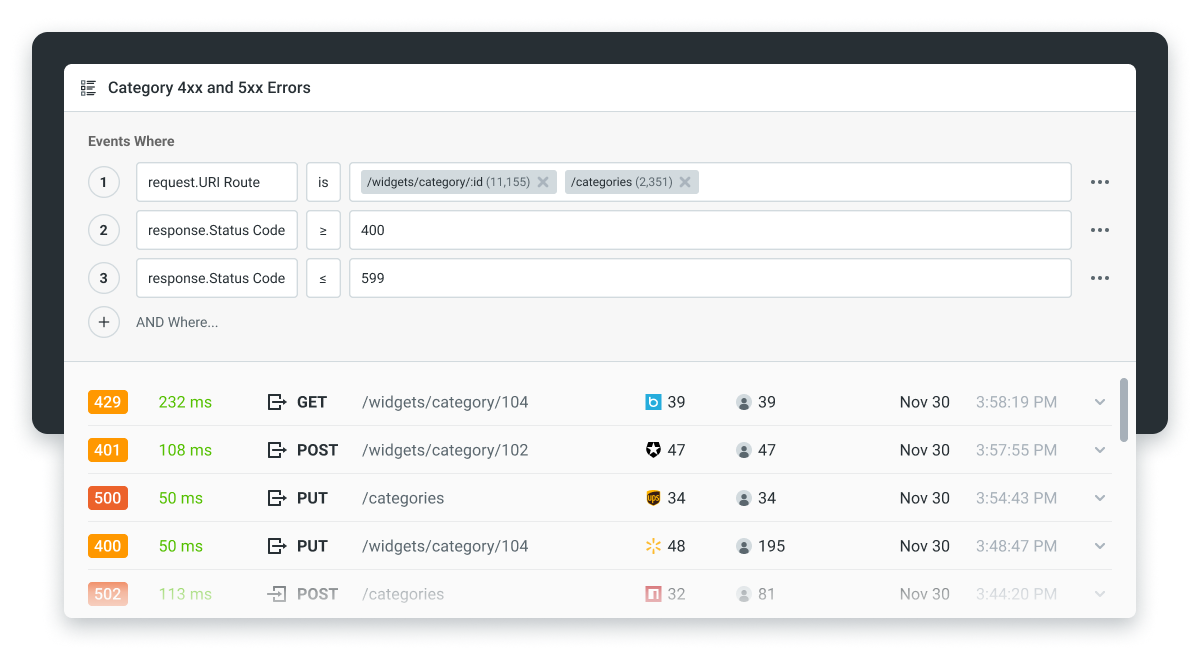
That is where API analytics earns its keep. Our platform sits on top of your gateway, ingesting every request, attributing it to a customer or pricing plan, and surfacing who is hitting 429s, on which endpoints, and how often. Across the API traffic we observe, a common pattern after a new rate limit ships is that 5–10% of customers bump into it within the first week, and roughly a third of those are paying customers who should have been on a higher tier. Catching that early is the difference between a quiet rollout and a Monday-morning support queue.
We do not enforce limits, that is the gateway’s job. We tell you whether the limits are doing what you intended, surface upsell triggers when a customer consistently exceeds quota, and give you per-customer breakdowns for contract renegotiation. The Moesif platform can unify the picture across Kong, AWS, Apigee, Azure APIM, and others; the same usage data feeds policy enforcement and monetization when limits become pricing tiers.
Wrapping Up
Rate limiting is high-leverage work. A few hundred lines at the gateway shuts down categories of abuse, protects your backend from runaway clients, and turns capacity into tiered pricing. The four algorithms cover nearly every traffic shape, the 429 contract is standardized, and the libraries are mature.
Once limits are live, you need visibility into who is hitting them and whether your tiers fit how customers actually use the API. Pair whatever gateway enforces your limits with an analytics layer that watches the result.
Frequently Asked Questions
What is the meaning of rate limiting?
Rate limiting controls how many requests a client can send inside a fixed time window. Over the cap, the server either rejects further requests (HTTP 429) or queues them until the window resets.
What does it mean when something is rate-limited?
You have hit the maximum number of requests the server will accept in the current window. Wait for the period in the Retry-After or RateLimit-Reset header before retrying. Hammering a server that already told you to back off usually extends the lockout.
What is rate limiting in API, with an example?
A typical rule is “100 requests per minute per API key.” The 101st request returns 429 Too Many Requests with a Retry-After header. GitHub allows 5,000 authenticated REST requests per hour; Stripe publishes account-level and endpoint-specific limits that vary by activity.
How do you choose the right rate limiting algorithm?
Start with sliding window counter for most public APIs. Move to token bucket if your traffic is bursty. Use leaky bucket when downstream cannot tolerate bursts. Fixed window is fine for internal services where simplicity beats precision.

Related Articles

API Strategy
Leveraging AI For a Better API Strategy
Learn how to leverage AI to build and fortify your API strategy. Improve design, governance, documentation, and align APIs with business outcomes.
API Strategy
The 5 Best Mixpanel Alternatives of 2025
Learn about the best Mixpanel alternatives to determine the right analytics solution for your use case.

API Development
How to Leverage Moesif Effectively for API Observability
Effectively leverage Moesif for API observability through best practices for integration, event enrichment, custom actions, and engineering workflow integrat...
API Strategy
How to Build an Internal Chargeback Model for Your API and AI Usage Using Moesif
Use Moesif to implement internal chargebacks and enable precise API and AI cost attribution for better transparency and resource optimization.